Compressed-sensing reconstruction
Description
This example describes how to perform a compressed-sensingreconstruction of a CS-2 accelerated acquisition.
Loading Package
using LazyArtifacts # loading data
using SEQ_BRUKER_a_MP2RAGE_CS_360
using CairoMakie # plotting
In addition we load the package internally used to perform the reconstruction
using SEQ_BRUKER_a_MP2RAGE_CS_360.MRIReco
using SEQ_BRUKER_a_MP2RAGE_CS_360.MRIReco.RegularizedLeastSquares
Download the datasets
if you run the literate example offline change the following line by : `MP2artifacts = artifact"MP2RAGEdata"
datadir = Main.MP2_artifacts
@info "The test data is located at $datadir."
[ Info: The test data is located at /home/runner/.julia/artifacts/4636cfc72321e71ef30607c6b37dd24f9f3b57ee.If you want to perform your own reconstruction, you can change the following line in order to point to another a bruker dataset
path_bruker = joinpath(datadir, "MP2RAGE_CS2")"/home/runner/.julia/artifacts/4636cfc72321e71ef30607c6b37dd24f9f3b57ee/MP2RAGE_CS2"Compressed-sensing reconstruction
In order to use an advanced reconstruction we will pass some parameters that will be used by the reconstruction package MRIReco.jl
We have to create a parameter dictionnary that will be used. If you need more information about it take a look at MRIReco.jl
CS = Dict{Symbol,Any}()
CS[:sparseTrafo] = "Wavelet" #sparse trafo
CS[:reg] = L1Regularization(100.)       # regularization
CS[:solver] = FISTA    # solver
CS[:iterations] = 30

d = reconstruction_MP2RAGE(path_bruker; mean_NR=true,paramsCS = CS)
Dict{Any, Any} with 7 entries:
"LUT" => Float32[93.0 0.5; 94.0 0.5; … ; 5287.0 -0.5; 5288.0 -0.5]
"params_reco" => Dict{Symbol, Any}(:iterations=>30, :solver=>FISTA, :reg=>…
"params_MP2RAGE" => ParamsMP2RAGE(800.0, 2284.1, 7.0, 5000.0, 128, 7.0, 7.0)
"im_reco" => ComplexF32[20.6381+0.388103im 9.92554+14.6923im … 68.116-…
"T1map" => Float32[2696.0 2278.0 … 1305.0 1510.0; 2310.0 1173.0 … 10…
"params_prot" => BrukerFile: /home/runner/.julia/artifacts/4636cfc72321e71…
"MP2RAGE" => Float32[-0.376485 -0.289886 … 0.0995646 -0.00490409; -0.2…for comparison purposes let's perform the undersampled reconstruction (without the paramCS keyword)
d_under = reconstruction_MP2RAGE(path_bruker; mean_NR=true)Dict{Any, Any} with 7 entries:
"LUT" => Float32[93.0 0.5; 94.0 0.5; … ; 5287.0 -0.5; 5288.0 -0.5]
"params_reco" => Dict{Any, Any}(:iterations=>1, :reconSize=>(128, 128, 96)…
"params_MP2RAGE" => ParamsMP2RAGE(800.0, 2284.1, 7.0, 5000.0, 128, 7.0, 7.0)
"im_reco" => ComplexF32[61.384+125.592im 14.4562+114.85im … 53.37-60.3…
"T1map" => Float32[2459.0 2475.0 … 1001.0 1787.0; 1923.0 1697.0 … 12…
"params_prot" => BrukerFile: /home/runner/.julia/artifacts/4636cfc72321e71…
"MP2RAGE" => Float32[-0.332155 -0.335455 … 0.262488 -0.128779; -0.1807…We can check the results
begin
  f = Figure(size=(500,400))
  ax=Axis(f[1,1],title="TI₁ undersampled")
  h=heatmap!(ax,abs.(d_under["im_reco"][:,:,60,1,1]),colormap=:grays)

  ax=Axis(f[1,2],title="TI₁ CS")
  h=heatmap!(ax,abs.(d["im_reco"][:,:,60,1,1]),colormap=:grays)


  ax=Axis(f[2,1],title="T₁ map undersampled")
  h=heatmap!(ax,d_under["T1map"][:,:,60,1],colorrange = (500,2000))

  ax=Axis(f[2,2],title="T₁ map CS")
  h=heatmap!(ax,d["T1map"][:,:,60,1],colorrange = (500,2000))

  for ax in f.content   # hide decoration befor adding colorbar
    hidedecorations!(ax)
  end

  Colorbar(f[2,3],h,label = "T₁ [ms]", flip_vertical_label=true)
  f
end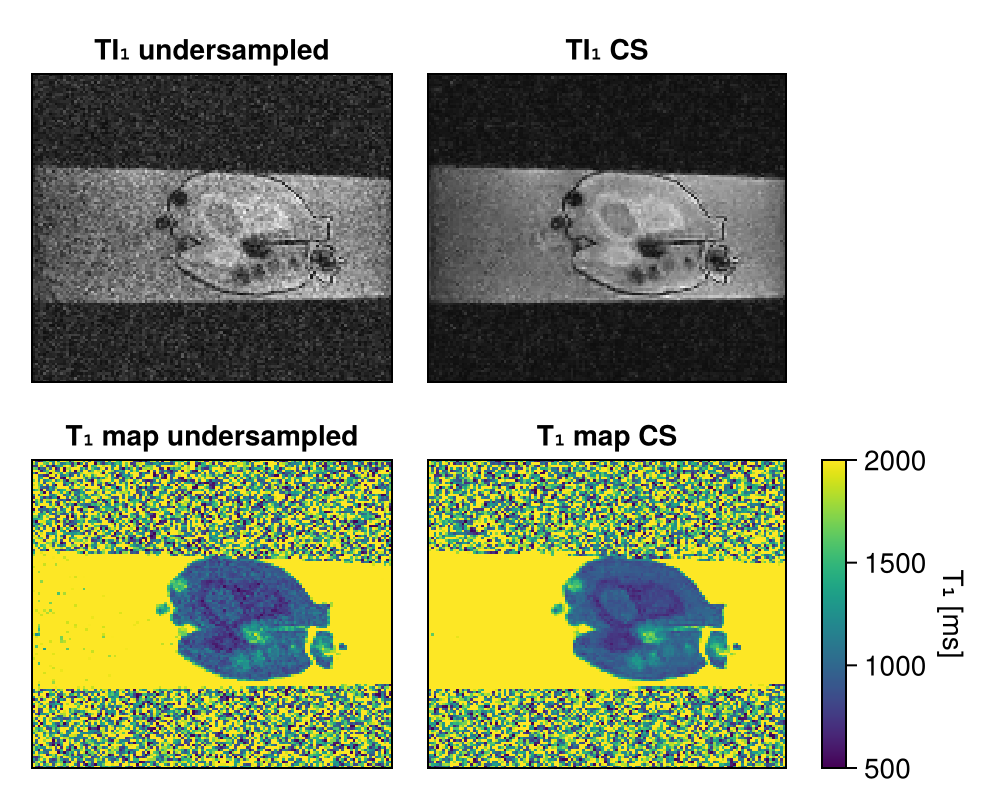
Write results in BIDS format
Results can be written following most of the qBIDS format recommandation
subject_name = "sub_01_cs"
dir_path = "" # directory path where the files will be create
write_bids_MP2RAGE(d,subject_name,dir_path)
This page was generated using Literate.jl.